.%20TODO(brand):%20replace%20with%20the%20master%20vector%20from%20the%20brand%20files.%20--%3e%3cdefs%3e%3clinearGradient%20id='rudratic-mark'%20x1='0'%20y1='195'%20x2='0'%20y2='828'%20gradientUnits='userSpaceOnUse'%3e%3cstop%20offset='0'%20stop-color='%235a0bd8'%20/%3e%3cstop%20offset='1'%20stop-color='%23a5157c'%20/%3e%3c/linearGradient%3e%3c/defs%3e%3cg%20fill='url(%23rudratic-mark)'%3e%3cpath%20d='M253%20448%20545%20195l60%2070-292%20252z'%20/%3e%3cpath%20d='M348%20558%20473%20450v200L348%20768z'%20/%3e%3cpath%20d='M523%20405%20640%20305l83%2097-141%20120%20153%20128-102%2087-110-97z'%20/%3e%3cpath%20d='m663%20763%2072-61v126z'%20/%3e%3c/g%3e%3c/svg%3e)
PAM for DevOps: securing CI/CD pipelines and machine access
PAM for DevOps: replace pipeline secrets with short-lived credentials, gate infrastructure as code, approve production changes and keep an audit trail.
Key takeaways
- PAM for DevOps applies privileged access controls to pipelines, service accounts and automation: short-lived credentials, least privilege, approval for risky changes and a complete audit trail.
- GitHub Actions OIDC lets a workflow exchange a signed token for a cloud access token that is valid for a single job, so no long-lived cloud secret is stored in GitHub.
- OWASP lists insufficient credential hygiene as CICD-SEC-6 and recommends temporary credentials over static ones, with rotation where static credentials cannot be avoided.
- Production deployments need a human gate: OWASP's CICD-SEC-1 recommends extra approval before accounts can trigger production builds and deployments.
- Secrets that must persist belong in a vault with rotation and checkout records, not in pipeline variables or scripts.
PAM for DevOps means treating CI/CD pipelines, service accounts and automation scripts as privileged identities, because they hold the keys to production. In practice it comes down to four controls: replace stored pipeline secrets with short-lived credentials issued per job, give each pipeline only the permissions its deployment needs, put a human approval in front of risky production changes, and keep an audit trail of every privileged action. This guide is for DevOps, platform and security engineers who run pipelines against cloud accounts and servers, and want a practical path from long-lived secrets to governed machine access.
PAM for DevOps is the application of privileged access management to the identities and credentials used by build, deployment and automation systems, so that machine access to production is short-lived, least-privilege, approved where it matters and fully recorded.
Why CI/CD pipelines are a privileged access problem
A deployment pipeline usually holds more power than most engineers: it can create infrastructure, change permissions and push code to production, often across several accounts. The credentials behind it tend to be long-lived, broadly scoped and copied into pipeline variables, scripts and runner configuration. Anyone who can change a workflow file, or compromise a build dependency, can try to use them.
The OWASP Top 10 CI/CD Security Risks puts several of these issues on its list, including inadequate identity and access management (CICD-SEC-2), insufficient credential hygiene (CICD-SEC-6) and insufficient logging and visibility (CICD-SEC-10). Each maps to a PAM control.
| OWASP CI/CD risk | What goes wrong | PAM for DevOps control |
|---|---|---|
| CICD-SEC-1 Insufficient flow control | One person can push code or artifacts to production without review | Approval gates before production deployments |
| CICD-SEC-2 Inadequate IAM | Pipeline and user identities hold more access than needed | Per-pipeline roles scoped to one deployment |
| CICD-SEC-6 Insufficient credential hygiene | Secrets are static, shared, logged or never rotated | Short-lived federated credentials; vault and rotation for the rest |
| CICD-SEC-10 Insufficient logging and visibility | Attacker actions in the pipeline go unnoticed | Central audit of runs, approvals and privileged calls |
How short-lived credentials replace pipeline secrets
OWASP’s guidance on credential hygiene is direct: prefer temporary credentials over static ones, rotate static credentials that cannot be avoided, scope secrets so each pipeline and step reaches only what it needs, and keep secrets out of console output and artifacts. It notes that credentials used in pipelines are often printed to logs, deliberately or by accident.
AWS’s IAM best practices make the same point for workloads: managed CI/CD platforms outside AWS can still use temporary credentials, for example by calling AssumeRoleWithWebIdentity with a JSON web token from an identity provider configured in the account. The role session that results lasts from 15 minutes up to the role’s maximum session duration, one hour by default.
GitHub Actions OIDC as an example
GitHub’s OpenID Connect documentation describes the flow. Each job requests a signed OIDC token from GitHub’s provider, the cloud provider checks the token’s subject and other claims against the conditions in the role’s trust definition, and, if they match, issues a cloud access token valid for that single job. You no longer duplicate cloud credentials as long-lived GitHub secrets.
The security of this depends on the trust conditions. The subject claim can identify a specific repository and environment, such as prod, so a production role can trust only production jobs from one repository. Pair it with GitHub’s secure use guidance: give GITHUB_TOKEN the minimum permissions, pin third-party actions to a full-length commit SHA, and do not use self-hosted runners for public repositories.
Where vaulted secrets still belong
Some credentials cannot be federated: third-party API keys, SSH keys for servers, database passwords for systems without token-based sign-in. These should live in a vault, be rotated on a schedule, and be released to people with a record of who checked them out and when.
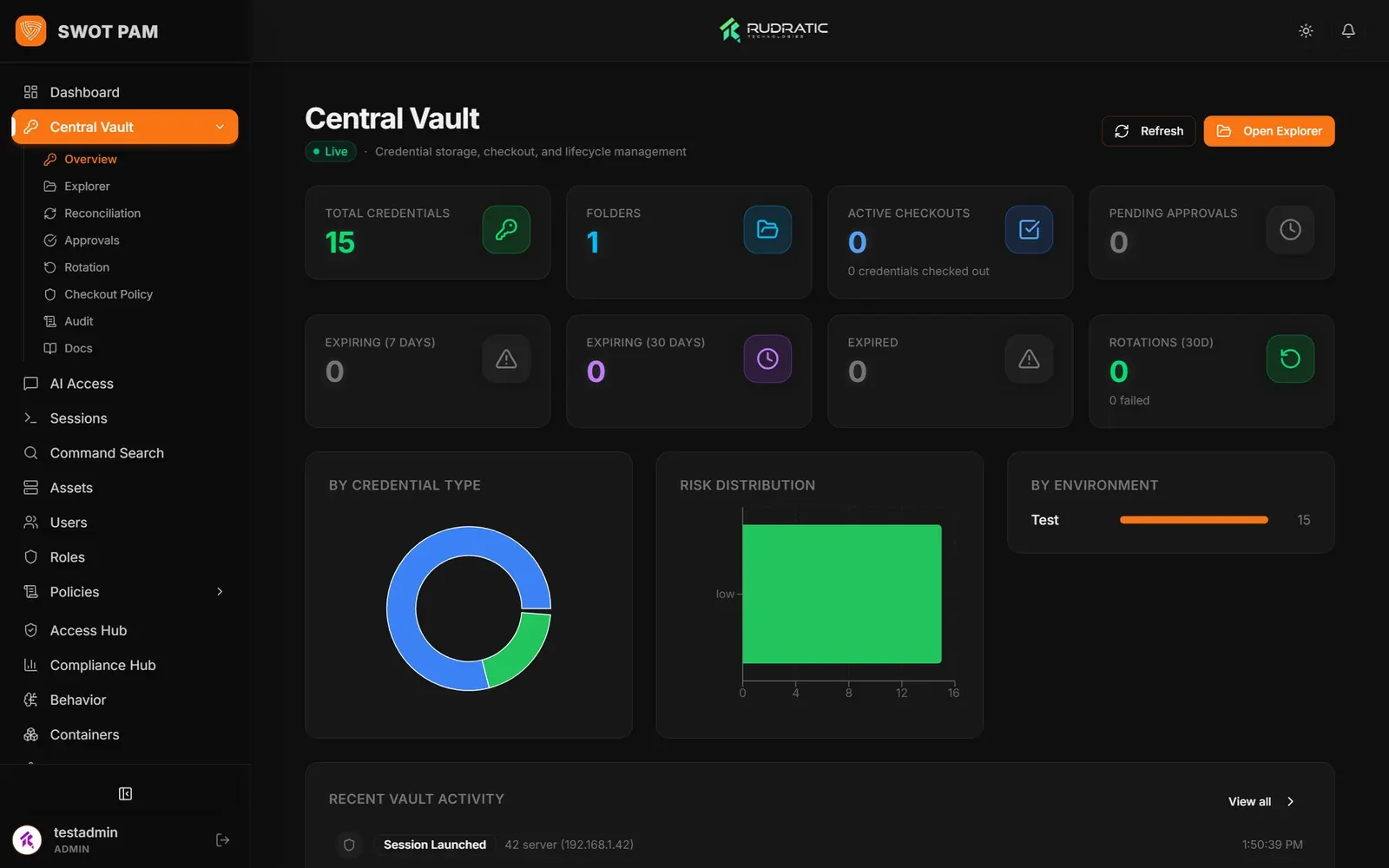 SWOT PAM: the credential vault.
The SWOT PAM Central Vault holds passwords, SSH keys, cloud keys and API tokens, encrypted with AES-256-GCM and a unique IV for every record, with the master key kept outside the database. A credential can be checked out for a set time and rotated on a schedule you set, such as every 30 days, or as soon as it is checked back in, so the copy someone saw stops working. The most sensitive systems can require a second approver. See credential vaulting for the wider pattern.
How to gate infrastructure as code
Federation decides who the pipeline is; it does not decide what the pipeline may do once it has a role. An infrastructure-as-code run with broad rights can disable logging or mint a long-lived key as easily as it deploys a service. Two layers help: tightly scoped deployment roles, and inspection of the calls automation makes.
SWOT Cloud PAM provides the second layer for AWS, Azure and GCP. Console, CLI, SDK and infrastructure-as-code calls that pass through its Access Gateway are checked against policy, and operations marked as dangerous are denied before they leave it. Rudratic’s demo policy, for example, blocks cloudtrail:DeleteTrail and iam:CreateAccessKey, the call that mints a long-lived key. Each event joins a SHA-256 hash chain, and CloudTrail and Azure Activity Log ingestion act as a backstop.
Approvals for production changes
OWASP’s CICD-SEC-1 describes the risk of one person pushing code or artifacts down the pipeline because nothing enforces review. Its recommendations include branch protection on branches that feed production and additional approval before accounts can trigger production builds and deployments.
GitHub implements this with deployment environments: up to six required reviewers (one approval lets the job proceed), an option to prevent self-review, a wait timer, and environment secrets released only after those rules pass. Note that GitHub Free users can configure environments only for public repositories.
For release runbooks that run on servers rather than in a CI system, FlowForge adds the gate inside the workflow. It can pull runbooks, scripts and workflow YAML from your GitHub organisations, or import .yml pipelines, and run them agentlessly over SSH and WinRM. A manual gate stops the run before a risky step, such as restarting production web servers, until an operator approves. Standard users can run only the automations an administrator has mapped to them.
Auditing pipeline and automation activity
OWASP’s CICD-SEC-10 recommends mapping every CI/CD system, enabling logs that are often off by default for both human and programmatic access, centralising them in a SIEM and alerting on anomalies. A complete record of a production change ties together the commit, the person who approved it, the credential the job obtained and every privileged call it made.
FlowForge’s audit ledger records every execution, terminal command and configuration change with the time, user, target, action and client IP, and can forward logs to platforms such as Datadog or Splunk. SWOT PAM seals each audit event with a SHA-256 hash of its contents and of the previous event, so a changed or deleted row breaks the chain.
PAM for DevOps checklist
Work through the list per pipeline, starting with the ones that deploy to production.
- Inventory every credential each pipeline uses, where it is stored and what it can reach.
- Replace cloud access keys with federation (for example GitHub Actions OIDC) and per-job temporary credentials.
- Scope each trust policy to one repository and, for production, one environment.
- Give each deployment role only the permissions that deployment needs; no shared “pipeline admin” role.
- Move secrets that cannot be federated into a vault with rotation and checkout records.
- Route infrastructure-as-code calls through a gateway or policy that denies log tampering and key creation.
- Require approval, with self-review prevented, before any production deployment or risky runbook step.
- Set
GITHUB_TOKENto minimum permissions and pin third-party actions to commit SHAs. - Send pipeline, approval and cloud audit logs to one central place and alert on unusual activity.
- Review unused pipeline credentials and roles on a schedule and remove them.
Next steps
PAM for DevOps replaces stored pipeline secrets with short-lived credentials, keeps the secrets that remain in a rotating vault, and puts approval and audit around the changes automation makes. SWOT PAM, SWOT Cloud PAM and FlowForge each cover one part of that chain. See how they fit together on the DevOps pipelines solution page, or book a demo with your own release process.
Questions
Is a secrets manager enough for CI/CD security?
It is a large improvement on secrets in code, but it still stores long-lived values that any job with access can read. Use federation and short-lived credentials wherever the target supports them, keep a vault with rotation for the secrets that must persist, and scope each pipeline's access to only the secrets it needs.
How should we scope a GitHub Actions OIDC trust policy?
Match the token's claims as narrowly as you can. The subject claim identifies the repository and, for jobs that use one, the environment, so a production deployment role can trust only the production environment of one repository. A trust policy that accepts any repository in an organisation gives every workflow there the role.
Do pipelines need just-in-time access like engineers do?
They need the same outcome by a different route. A pipeline cannot wait for an approver on every API call, so it receives a short-lived credential per job through federation, with permissions limited to that deployment. The human approval sits earlier, at the gate that allows a production job to start.
What should we log from our pipelines?
Log who triggered each run, which approvals it passed, which credentials it obtained and which privileged calls it made. OWASP recommends enabling logs that are often off by default, covering both human and programmatic access, and sending them to a central location such as a SIEM so events can be correlated.
Sources
- OWASP: Top 10 CI/CD Security Risks
- OWASP: CICD-SEC-6 Insufficient Credential Hygiene
- OWASP: CICD-SEC-1 Insufficient Flow Control Mechanisms
- OWASP: CICD-SEC-10 Insufficient Logging and Visibility
- GitHub Docs: OpenID Connect
- GitHub Docs: Secure use reference
- GitHub Docs: Managing environments for deployment
- AWS: Security best practices in IAM
- AWS: Methods to assume a role
Products in this post


Keep reading
See it on your own systems
A walk-through of the products with the team that builds them.